Traffic Car Racer: Driving 3D
Meta Play StudioRacing
4.549.00 Reviews
- Version
- 1.1.3
- Installs
- 1.00M
- Age Rating
- Everyone
Screenshots
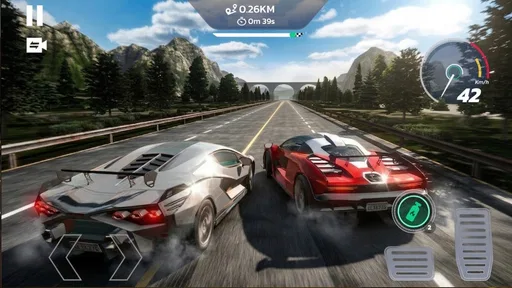
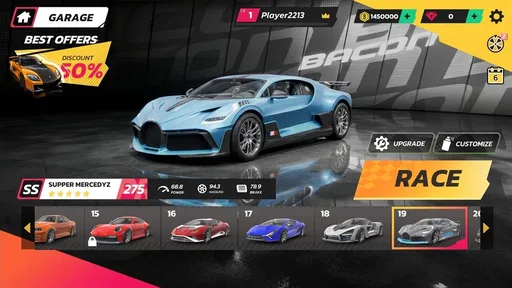
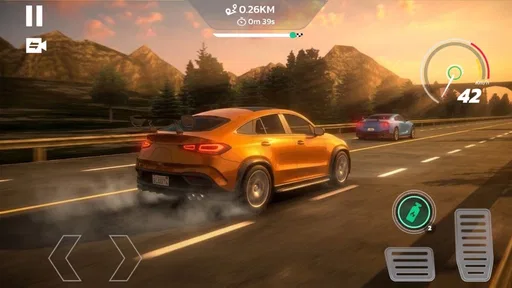
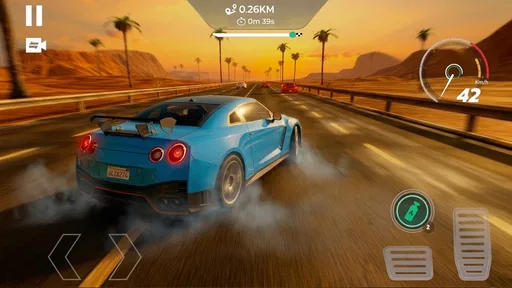
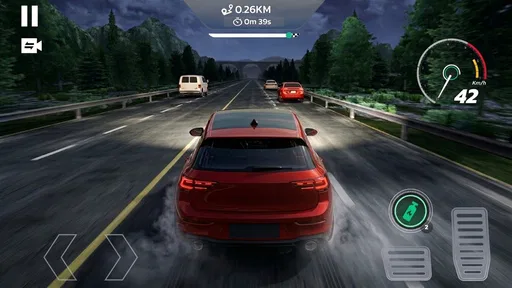
Our Review of Traffic Car Racer: Driving 3D
 Analysis by Appyee
I approached Traffic Car Racer: Driving 3D as the kind of game you open when you want a quick driving challenge rather than a long story or a complicated garage simulator. It is a free racing game from Meta Play Studio, built around handling traffic on a highway while keeping control of a car in a three-dimensional environment. The idea is easy to understand immediately: stay alert, manage your movement, and turn a busy road into a test of timing.
That simplicity is its main attraction. I did not need to learn a fictional world, memorize a large menu system, or spend time understanding a career structure before getting to the road. At the same time, the straightforward design means the quality of each drive depends heavily on how much you enjoy repeating short, focused traffic runs. If you like improving your reactions and learning to make cleaner decisions, this has a pleasant pick-up-and-play rhythm. If you want deep vehicle tuning, licensed cars, or a detailed racing campaign, you may find it too narrow.
What the first drive feels like
The game presents itself as a highway traffic racer with realistic 3D driving physics. I would treat that wording as a description of its intended feel rather than a promise that it behaves like a full driving simulator. The important point is that the road is not simply a straight line where you can ignore everything around you. Other traffic creates the pressure, and your job is to read gaps, choose a safe line, and avoid turning a small mistake into the end of a run.
That makes the opening minutes more about observation than speed. A new player may instinctively focus on going faster, but the more useful habit is to watch the vehicles ahead and decide early whether a lane change is actually worth making. In my experience, the best first improvement comes from moving smoothly instead of reacting at the last possible moment. A cautious run teaches more than a reckless one because you begin to notice how much space you need to change direction comfortably.
The 3D presentation also helps with judging distance. Cars ahead are easier to read when you give yourself a moment to process their position, while sudden movements near the front of your car leave very little room for correction. I recommend treating the center of the road as a reference point during your first attempts. Once you understand how the car responds, you can start using narrower gaps with more confidence.
There is a useful distinction here between a successful drive and an exciting drive. Your first meaningful success should not be an ambitious, risky pass. It should be completing a clean stretch of highway without panicking. That small target gives you a practical baseline for learning the controls and makes later attempts feel like genuine progress rather than random luck.
Starting without overthinking the controls
When I install a traffic racer, I want to reach the road quickly, and this game suits that expectation. The basic setup is not something I would describe as a project. After launching, I would begin with a short session, keep my attention on the car’s response, and avoid trying to master every possible movement at once. The first few minutes are best used to answer simple questions: how quickly does the car change direction, how much correction is needed after a lane move, and how close can traffic get before the situation becomes difficult?
Those questions matter more than chasing a personal record immediately. A common beginner mistake is to hold a direction for too long, then compensate with an equally large movement in the opposite direction. That creates a zigzag pattern and makes traffic look more unpredictable than it really is. I found it more comfortable to make small adjustments, release the input, and reassess the road before committing to the next one.
If the game offers a choice of control approach on your device, I would test each option during a low-pressure run rather than deciding from the menu alone. Touch controls can feel direct, while tilt-style input, when available, can demand more physical space and a steadier grip. I would not assume that the setting that feels natural in another racing game will be best here. The right choice is the one that lets you make short, repeatable corrections without covering the road with your finger or moving the phone too much.
It is also worth beginning with the phone held in a stable position. A casual player might play while walking or while holding the device with one hand, but traffic racing punishes that kind of distraction. For a first session, I would sit down, keep both hands available if the control scheme benefits from them, and give the display your full attention. That simple change can make the game feel fairer before you have learned anything else.
The first clean pass is the real tutorial
The first time you pass another car without a last-second correction, you learn more than any short instruction could explain. You feel the amount of space required, see how quickly the road closes, and understand that a pass begins before you reach the vehicle beside you. I recommend choosing a gap that looks comfortably open, moving early, and returning to a stable line once the pass is complete.
Do not immediately repeat the move just because it worked once. Hold your line for a moment and let the traffic pattern settle. This is one of the more useful habits I took from the game: finish one decision before starting the next. Many crashes happen because a player is still recovering from a lane change while already planning another. Separating those actions makes the road easier to read and reduces frantic steering.
A practical first-session goal is to complete several ordinary passes while keeping the car under control. That goal is more useful than trying to squeeze through every available gap. It also gives you a way to tell whether the game matches your preferences. If you enjoy the concentration required for these small choices, you will probably appreciate longer sessions. If even a careful pass feels irritating, a more forgiving arcade racer may be a better fit.
I would also pay attention to how you respond after a mistake. Traffic games often create a temptation to restart instantly and repeat the same approach. Instead, remember the position of the road when the problem occurred. Were you changing lanes too late? Did you enter a gap without enough space to exit? Were you looking only at the nearest car instead of the traffic beyond it? Identifying the type of mistake turns repetition into practice.
Where new players can get confused
The biggest source of confusion is the difference between apparent open space and usable open space. A gap may look clear beside the nearest vehicle while another car farther ahead leaves no comfortable route. Before moving, I try to scan beyond the first obstacle. In a busy highway racer, the safest opening is often the one that gives you room to make the next decision, not merely the one that lets you get beside a single car.
Another issue is confusing speed with progress. Faster movement can make a run feel more exciting, but it also reduces the time available to interpret traffic. I would first build consistency at a manageable pace, then raise the intensity naturally as your reactions improve. This approach is especially helpful on a smaller phone, where nearby vehicles can occupy a large part of the screen and visual information becomes harder to process quickly.
Some players may also expect the phrase “realistic 3D driving physics” to mean that every behavior will match a dedicated simulator. I would keep expectations grounded. The game’s value is in combining a three-dimensional road with traffic decisions and responsive driving, not necessarily in replacing a full simulation setup. If your ideal racing game includes detailed mechanical adjustments, pit strategy, or a broad selection of carefully modeled vehicles, this is probably not the right destination.
The free price makes it easy to try, but free does not always mean completely frictionless. The game includes in-app purchases ranging from $0.99 to $19.99 per item. I would approach those purchases as optional spending rather than part of the basic reason to install it. A first-time player should spend enough time with the core driving loop to decide whether it is enjoyable before considering any paid addition. That is particularly important here because the central question is whether repeated highway runs hold your attention.
The age rating is Everyone, which makes it suitable as a broadly accessible racing option. Even so, younger players may still need help understanding that purchases can appear inside a free game. For families, I would make that expectation clear before handing over the device. The content is approachable, but responsible spending habits still matter more than the rating alone.
How I would use it in an ordinary day
Traffic Car Racer: Driving 3D works best for short breaks. I can picture opening it while waiting for an appointment, taking a few focused runs, and closing it without needing to remember a complicated plot or manage a long list of tasks. The highway format supports that kind of session because the objective is immediately readable: drive, react, and try to improve the next attempt.
For a commute, I would only use it before leaving or after arriving, never while walking through traffic or operating a real vehicle. That may sound obvious, but a game built around road awareness can be oddly tempting to play in situations where attention should remain elsewhere. Its quick-session design is convenient, yet convenience should not override basic safety.
It can also work as a reaction warm-up before another racing game. I would use a few runs to settle into judging distance and timing, then switch to a more elaborate title if I wanted customization or structured events. In that role, this game is less a replacement for every other racer and more a focused exercise in reading moving traffic.
One non-obvious advantage is that the game gives you a clear way to practice restraint. Many racing games reward aggressive overtaking, but highway traffic makes patience valuable. I found that deliberately skipping a questionable gap often produced a better run than forcing the pass. That lesson carries over to other traffic-based racers, where the player who preserves control usually outlasts the player who makes the flashiest move.
What changes after the basics become comfortable
Once the controls stop demanding all your attention, shift your focus from individual cars to traffic flow. Look for patterns: a slow cluster may require an early decision, while a more open section gives you time to stabilize. This wider view is where the game becomes more interesting. You are no longer just avoiding the car immediately ahead; you are planning around the shape of the road in front of you.
I also recommend using a “one variable at a time” approach. If you want to improve, do not simultaneously drive faster, attempt tighter passes, and change your control style. Pick one adjustment for a few runs. For example, keep your usual pace but begin lane changes earlier. If the results improve, you have learned something specific. If they worsen, you know what to undo.
That method is especially helpful because the game’s simple premise can make losses feel vague. Without a long progression system to analyze, players may blame the traffic or the controls when the real issue is a repeated habit. Isolating one behavior makes the challenge more measurable, even when the game itself keeps the presentation uncomplicated.
Players who enjoy competition with themselves should keep a mental note of the conditions that lead to their best runs. Was the cleanest attempt the one where you stayed conservative? Did you perform better after switching to a steadier grip? Did you lose control after trying to recover too quickly? These observations are more valuable than chasing an impressive-looking maneuver that you cannot repeat.
Performance expectations and device fit
The game supports Android devices running version 7.0 or later, so it is available to a wide range of compatible phones and tablets. That broad support is useful for people who do not own a recent flagship, although the visual experience can still vary with the device. I would close other demanding apps, keep the screen clean, and test a short session before deciding whether the phone feels comfortable for longer play.
Three-dimensional driving places more visual demand on a device than a flat, minimalist racing game. If your phone becomes warm, loses responsiveness, or makes the road difficult to read, I would treat that as a reason to shorten sessions rather than forcing the issue. Smooth control matters more than simply having the game installed. A small delay during a lane change can turn a reasonable decision into a frustrating collision.
The current version is 1.1.3, which is the release I would look for when checking whether my installation is up to date. Keeping the installed version current is sensible for any game, but I would still judge the experience by how it runs on your particular device. Version information alone cannot guarantee that every phone will feel identical, especially when screen size and input response differ.
Who should install it, and who should choose something else?
I would recommend this game to someone who wants a free, accessible racing experience centered on highway traffic and quick decisions. It is a good match for players who enjoy repeating a run to improve timing, prefer a straightforward starting point, and do not need a large collection of modes before having fun. The average rating of 4.5 from roughly 977 ratings, along with more than one million installs, suggests that the basic idea has attracted a substantial audience.
Those figures are useful context, but they should not replace your own priorities. A high level of interest does not make the game ideal for everyone. I would skip it if you mainly want realistic car ownership, extensive customization, online competition, or a structured championship. I would also look elsewhere if repeated traffic avoidance feels more stressful than satisfying. A calmer endless runner or a track-based arcade racer may offer a better mood.
Compared with a traditional circuit racer, this game puts less emphasis on braking for corners and learning a fixed course. Compared with a full simulator, it asks for less preparation and offers a more immediate route to play. Compared with an endless driving game that focuses only on scenery, it gives traffic a more active role in every decision. Its strongest position is between those alternatives: more engaging than passive cruising, but less demanding than a serious simulation.
The developer, Meta Play Studio, has kept the concept easy to understand, and that clarity is valuable for first-time players. Still, the same focused design can feel limited after the novelty of avoiding traffic wears off. I would give it a fair trial over several short sessions rather than judging it after one crash. If the act of reading gaps and making controlled passes begins to feel rewarding, the game has enough of a core loop to justify keeping it installed.
My recommended path from installation to confidence
After installing, I would begin with a quiet, uninterrupted run and concentrate only on learning the car’s movement. I would avoid paid items at the start, keep the first target modest, and aim for a clean stretch of road instead of maximum speed. Once that feels manageable, I would practice one early lane change, return to a stable line, and observe how the next group of vehicles changes the decision.
On the following attempts, I would work on looking past the nearest car and leaving an escape route whenever possible. If a pass requires a desperate correction, I would count it as a warning rather than a success. That mindset makes the game less about gambling on narrow openings and more about developing reliable judgment. It is also the best way to reach the first genuinely satisfying milestone: completing a run because your choices were controlled, not because traffic happened to cooperate.
My final opinion is positive but measured. Traffic Car Racer: Driving 3D is best understood as a focused highway challenge, not a complete racing simulator. Its free entry, Everyone rating, broad Android compatibility, and simple premise make it easy to recommend for casual players who enjoy short sessions. The in-app purchase range means I would remain selective about spending, and the limited concept may not satisfy players looking for depth beyond traffic driving.
For the right person, though, that focus is exactly the point. I like that the game gives a first-time player a clear path: learn the response, make one clean pass, read farther ahead, and gradually take on more demanding gaps. If that kind of steady improvement sounds enjoyable, I think it is worth trying. If you want a garage, a campaign, or a competitive racing ecosystem, choose a different game before paying for extras here.
Privacy and Permissions
See what permissions an app requests and how it handles your data.
- Wi-Fi connection information
- view Wi-Fi connections
- Other
- view network connections, full network access, control vibration, prevent device from sleeping, Google Play license check
Verdict
Strengths of Traffic Car Racer: Driving 3D
- Simple controls make it easy for beginners to start driving.
- Several camera angles improve visibility during races.
- Short races are convenient for quick gaming sessions.
- Traffic-filled roads create engaging moments and require quick reactions.
- Runs smoothly on many mid-range devices.
Limitations of Traffic Car Racer: Driving 3D
- Gameplay can feel repetitive after extended play.
- Limited customization reduces long-term personalization.
- Some tracks may look too similar to one another.
- Difficulty can increase suddenly in heavier traffic.
- Ads may interrupt the experience between races.
Similar Picks in This Category
View All
Hill Climb Racing
Fingersoft4.3

Dr. Driving
SUD Inc.4.2

Traffic Rider
skgames4.5

Asphalt 8 - Car Racing Game
Gameloft SE4.6

Race Master 3D: Car Racing
Beresnev Games4.6

Extreme Car Driving Simulator
AxesInMotion Racing4.3
Frequently Asked Questions
What is Traffic Car Racer: Driving 3D?
Traffic Car Racer: Driving 3D is a mobile driving game focused on weaving through busy roads while controlling a car from a three-dimensional perspective. The main challenge is to travel as far as possible, avoid collisions, and improve your performance through careful steering and timing. It is designed for short, casual sessions rather than a realistic racing simulation.
How do you play Traffic Car Racer: Driving 3D?
Gameplay is based on controlling your vehicle through traffic and reacting quickly to surrounding cars. Depending on the version and device, steering may use touch controls, buttons, or tilt movement. You generally need to maintain a safe line, overtake vehicles without crashing, and continue driving to achieve better distances or scores. Learning when not to overtake is just as important as driving fast.
Can Traffic Car Racer: Driving 3D be played offline?
The core driving experience may be available without a continuous internet connection, which makes the game suitable for quick entertainment while traveling or when mobile data is limited. However, features such as advertisements, online rankings, updates, cloud-related services, or promotional content may require internet access. It is best to launch the game once while connected before relying on offline play.
Is Traffic Car Racer: Driving 3D free to download and play?
Traffic Car Racer: Driving 3D is generally offered as a free download, allowing players to install the basic game without paying upfront. Free versions commonly support themselves through advertisements and may include optional purchases, depending on the platform and release. Before downloading, check the official store listing for current pricing, in-app purchase details, and any device-specific restrictions.
What devices are compatible with Traffic Car Racer: Driving 3D?
Compatibility depends on the particular Android or iOS release, as well as the operating system version and hardware requirements listed by the developer. A device with enough available storage, updated system software, and reasonable graphics performance should provide a smoother experience. Older phones or tablets may experience slower loading, reduced visual quality, or occasional performance issues, so reviewing the store requirements is recommended before installation.
Play our best games!


